
大家好,我是快乐学习,开心分享的科技探索员🎉
走过前三期,我们已经打通了LCD 从物理原理、接口协议到Linux 驱动的完整链路。这一期是系列收官篇,进入应用层——图像数据怎么送到 LCD 上?Qt 界面如何在嵌入式 Linux 上跑起来?OpenGL ES 怎么利用 GPU 渲染?摄像头实时预览怎么做?
▍ 一、Linux 显示架构全景:三条渲染路径

▲ 嵌入式 Linux 三条显示渲染路径——直写fb0 / Qt+EGLFS / OpenGL ES+EGL
路径①:直接写 /dev/fb0(最简单)
应用程序 mmap /dev/fb0 直接写 RGB 像素数据。无需 GPU,CPU 直接写内存。适合简单状态显示、调试、低功耗 MPU。缺点:无硬件加速,全屏刷新 CPU 占用高,无双缓冲防撕裂。
路径②:Qt + LinuxFB / EGLFS 插件
Qt 的 QPA 平台抽象层屏蔽底层差异。LinuxFB:纯软件渲染,写 fb0,无 GPU 依赖。EGLFS:GPU 渲染,通过 EGL 直接操作 DRM/KMS,性能最佳。适合绝大多数嵌入式 HMI 开发。
路径③:OpenGL ES + EGL + DRM(性能最优)
利用 GPU 硬件加速渲染,CPU 解放。适合需要 2D/3D 动效、视频流、地图渲染的高性能场景。
▍ 二、直接操作 Framebuffer:C 语言画像素
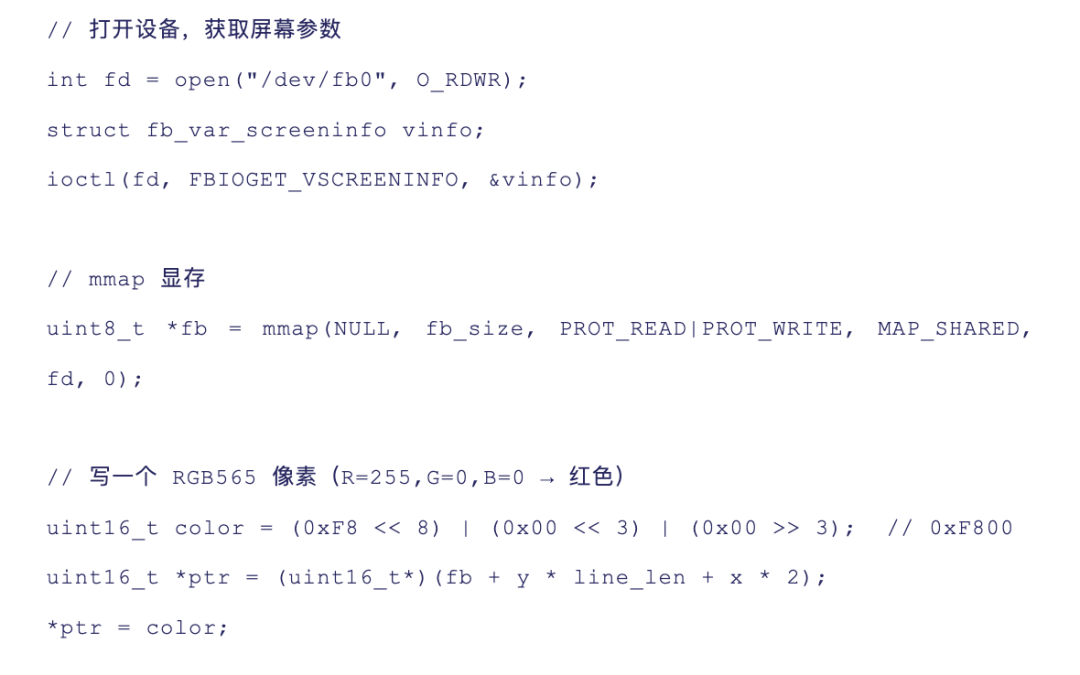
⚠️ 双缓冲防撕裂:直接写 fb0 会导致画面撕裂。用 fb_var_screeninfo.yoffset配合 FBIOPAN_DISPLAY ioctl 实现页翻转——用一块 2 倍高度的显存,交替写前半和后半,刷新完整后切换显示偏移。
▍ 三、Qt 嵌入式部署:从编译到上屏
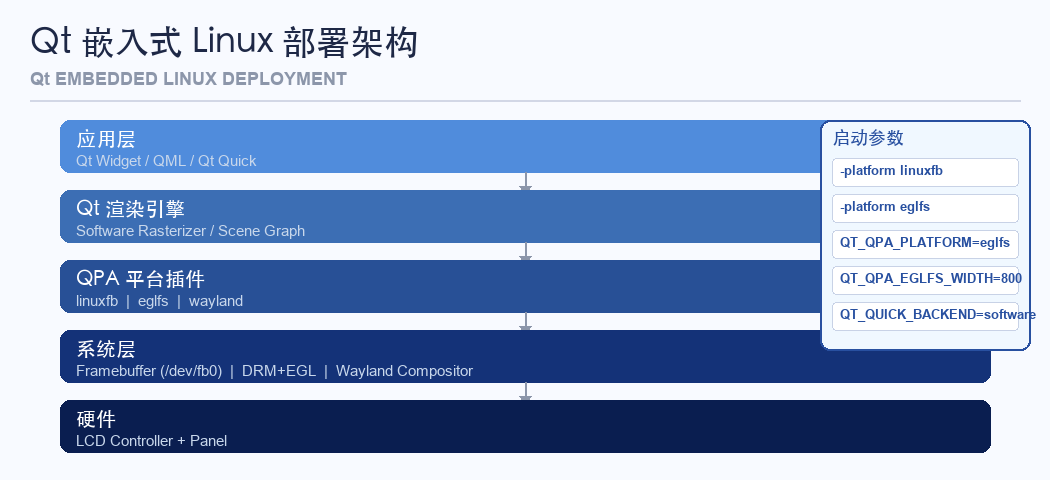
▲ Qt 嵌入式 Linux 部署架构——应用层到 QPA 平台插件到系统层
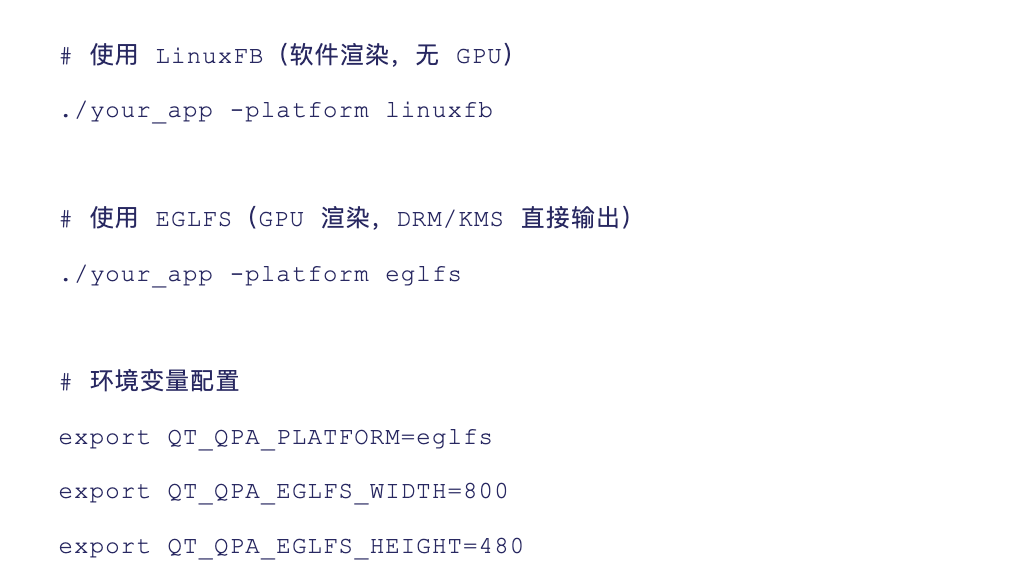
💡 EGLFS 调试:Could not find DRM backend → 检查 /dev/dri/card0 是否存在;EGLFS: OpenGL ES 2.0 not available → GPU 驱动未正确加载;屏幕空白 → 设置 QT_LOGGING_RULES='qt.qpa.eglfs*=true' 查看日志。
▍ 四、V4L2 摄像头流实时显示在 LCD
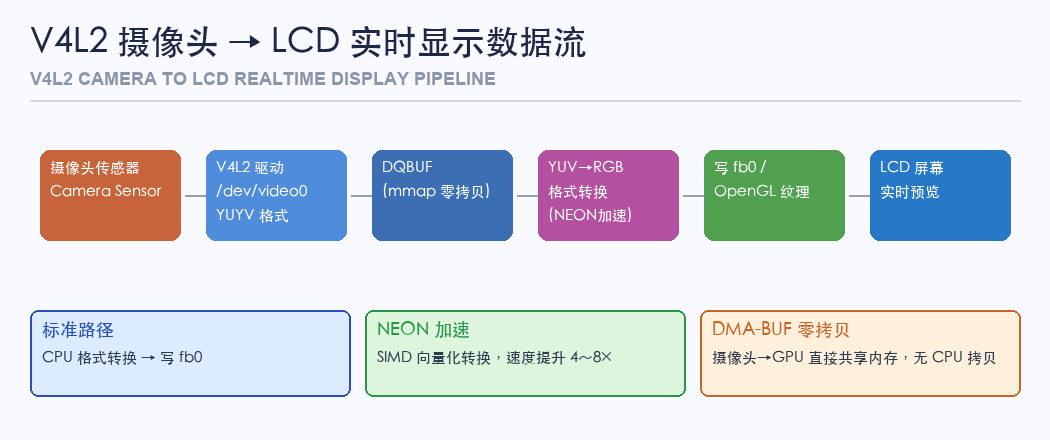
▲ V4L2 摄像头到 LCD 实时显示数据流——标准路径 / NEON加速 / DMA-BUF零拷贝
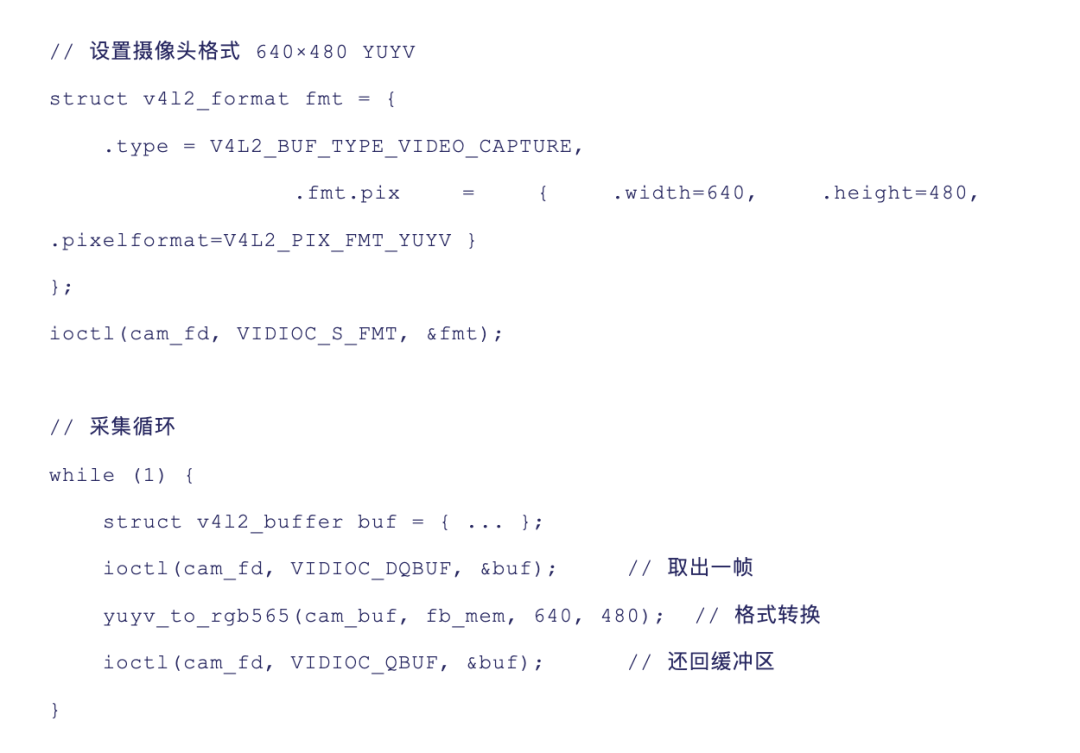
💡 零拷贝方案:使用 DMA-BUF 在摄像头驱动和 GPU 之间直接共享内存,避免两次拷贝。这是车载 ADAS 和手机相机预览管线的标准做法。
▍ 五、HMI 性能优化:让界面更流畅的 5 个技巧
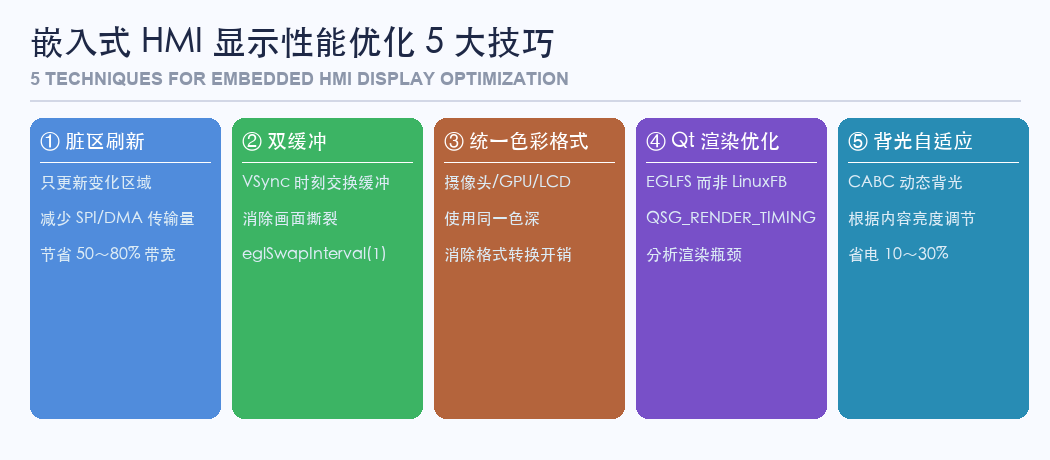
▲ 嵌入式 HMI 显示性能优化 5 大技巧
• ① 脏区刷新(Partial Update):只刷新变化的矩形区域,节省50~80% 带宽
• ② 双缓冲 / 三缓冲:VSync 时刻交换缓冲,消除画面撕裂
• ③ 减少 RGB 格式转换:摄像头/GPU/LCD 统一色彩格式,消除转换开销
• ④ Qt 渲染优化:EGLFS 而非 LinuxFB,开启 QSG_RENDER_TIMING 分析瓶颈
• ⑤ 背光亮度自适应(CABC):根据内容动态调节背光,可降低 10~30% 功耗
▍ 六、LCD 显示屏系列总结:四期知识体系回顾
• ①显示技术全景:TN/IPS/VA液晶原理,CCFL/LED/Mini-LED背光进化,LCD vs OLED 选型指南
• ②驱动芯片与接口协议:SPI/RGB/MIPI DSI/LVDS 四大接口,主流驱动IC,时序参数计算,初始化序列解析
• ③Linux LCD驱动开发:Framebuffer vs DRM drm_panel 双框架,SPI LCD 完整驱动,MIPI DSI 调试,背光 PWM
• ④应用层开发实战:直写fb0,Qt+EGLFS,OpenGL ES+EGL GPU 渲染,V4L2摄像头实时显示,HMI性能优化
Hello! I am Happy Learning, Sharing Fun — your tech explorer. 🎉
After three episodes, we’ve traced the full path of LCD operation: from physical principles and interface protocols to Linux driver development. This final installment moves us into the application layer: how do we actually get image data onto the LCD? How do we run Qt interfaces on embedded Linux? What about OpenGL ES for GPU rendering? And how do we achieve real-time camera preview?
▍1. Linux Display Architecture: Three Rendering Paths
▲ Three rendering paths in embedded Linux: direct write to fb0, Qt + EGLFS, OpenGL ES + EGL
Path ①: Direct write to /dev/fb0 (simplest)
Applications can mmap /dev/fb0 and write RGB pixel data directly — no GPU required, just CPU. This is ideal for simple status displays, debugging, or low-power microcontrollers. The downside? No hardware acceleration, high CPU usage during full-screen updates, and no anti-tearing protection.
Path ②: Qt + LinuxFB / EGLFS plugin
Qt’s QPA abstraction layer hides the hardware differences. LinuxFB uses software rendering (write to fb0), while EGLFS leverages GPU acceleration via EGL. EGLFS is the best performer for most embedded HMI projects.
Path ③: OpenGL ES + EGL + DRM (highest performance)
By offloading rendering to the GPU, this path frees up the CPU and enables smooth 2D/3D animations, video streaming, and map rendering — essential for high-performance displays.
▍2. Direct Framebuffer Manipulation: Drawing Pixels in C
⚠️ Double buffering to prevent tearing: Writing directly to fb0 can cause visible tearing (jagged edges or split images). The solution: use fb_var_screeninfo.yoffset and FBIOPAN_DISPLAY ioctl to implement page-flipping — draw to the lower half of a doubled memory buffer while waiting for a full update before switching the display offset.
▍3. Deploying Qt on Embedded Devices: From Compilation to Screen
▲ Qt’s embedded Linux deployment architecture: application layer → QPA plugin → system layer
💡 EGLFS debugging: If you see “Could not find DRM backend”, check if /dev/dri/card0 exists; if “OpenGL ES 2.0 not available”, verify GPU driver loading; if screen is blank, enable logging with QT_LOGGING_RULES='qt.qpa.eglfs*=true'.
▍4. Real-Time Camera Stream (V4L2) to LCD
▲ V4L2 camera to LCD data flow: standard path, NEON acceleration, DMA-BUF zero-copy
💡 Zero-copy solution: Use DMA-BUF to share memory directly between the camera driver and GPU, avoiding two costly copy operations. This is the standard approach for automotive ADAS and smartphone camera previews.
▍5. HMI Performance Optimization: 5 Tips for Smoother Displays
▲ Five key strategies for improving embedded HMI display performance
• ① Dirty region updates: Only refresh changed areas of the screen, saving 50–80% of bandwidth
• ② Double/triple buffering: Swap buffers at VSync to eliminate tearing
• ③ Minimize RGB conversions: Keep camera/GPU/LCD in the same color space to avoid expensive format conversions
• ④ Optimize Qt rendering: Choose EGLFS over LinuxFB, and use QSG_RENDER_TIMING to identify bottlenecks
• ⑤ Adaptive backlight control (CABC): Adjust backlight intensity based on content to reduce power consumption by 10–30%
▍6. Conclusion: A Four-Part Journey Through LCD Mastery
• Part ①: Display technology primer — TN/IPS/VA, CCFL/LED/Mini-LED, LCD vs OLED
• Part ②: Driver chips & protocols — SPI/RGB/MIPI DSI/LVDS, timing parameters, initialization sequences
• Part ③: Linux driver development — Framebuffer vs DRM, SPI LCD drivers, MIPI DSI debugging, PWM backlight
• Part ④: Application-layer deployment — direct fb0 writing, Qt + EGLFS, OpenGL ES, V4L2 streaming, performance tuning