
如果单看纸面配置,CPU没变,内存没变、存储空间也没变。你可能会觉得:好家伙,这就改个名字当2026年新品卖了?
配置波澜不惊,外观不痛不痒。那这台机器,难道只是为了强行刷一波存在感吗?这篇文章咱们就来盘盘它。
一聊到彩屏,大家最关心的是色彩表现如何。我直接掏出了最新款的Kindle Scribe Colorsoft来跟它贴脸对比。结果可能让你们失望了:在细节上Kindle更好。
我把两台机器都调到最亮,Kindle这边的亮度更高;色彩表现上各有所长,比如文石的线条更清晰,颜色更浓一点,但Kindle的细节还原更多。

所以,如果你的终极需求就是买一台设备纯看漫画,那听我的,闭眼选Kindle。它的色彩调教更细腻,四边等宽的颜值也更高。但代价是,你要承受5800元的高昂票价。我手上这台,算上运费和税5828。
而T10C+的价格,足足便宜了2000多。用两千块的差价,换一点色彩上的妥协,这笔账划不划算,相信你们心里已经有数了。
而且Kindle还有一个致命伤:它是封闭系统,不能安装软件。如果你想要彩色电纸书,不仅是为了看漫画,还想装各种APP,刷刷网页、干点活儿,那这台开放系统的 T10C+,就值得说道说道了。
文石最新系统上,高清模式改名叫了净清模式,顾名思意,又干净又清晰。以前我只推荐用这个模式看书用。但这次我惊讶地发现,用它来刷网页,居然也非常不错。

没有对比就没有伤害。我在Kindle和文石上打开同一个网页,向下滑动。你能明显感觉到Kindle这边的迟钝,画面一卡一卡的。而T10C+,画面几乎是贴着手指在走。离近了看,残影也控制得很好。
甚至打开小红书这种全是高清大图的软件,大部分时间也能保持流畅。当你手指停住时,画面会稍微“哆嗦”一下——这是屏幕在刷新显示细节。

要是你觉得不喜欢这个哆嗦呢,就切到极速模式。以前我们总吐槽,极速模式满屏都是噪点和毛边。但这台机器上,除非你拿着放大镜看,否则在正常的阅读距离下刷新闻,你甚至会有“在用高清模式”的错觉。
只是在快刷模式下,图片显示质量要差一点,有些细节就看不出来了。就像这种浅色的关闭按钮,在快刷下你就看不到了,得切回净清模式。
除了刷软件以外,还可以把它架在阅读架上,连接上蓝牙键鼠,轻办公使用。在极速模式下,鼠标的响应出乎意料的跟手,几乎能做到“指哪打哪”,和在电脑上差不多了。

在键盘打字方面,你们可以看一下我的演示,我的打字速度不算快,但是能感觉到键盘按下文字就出现在屏幕上了。除了码字,也能处理表格了。
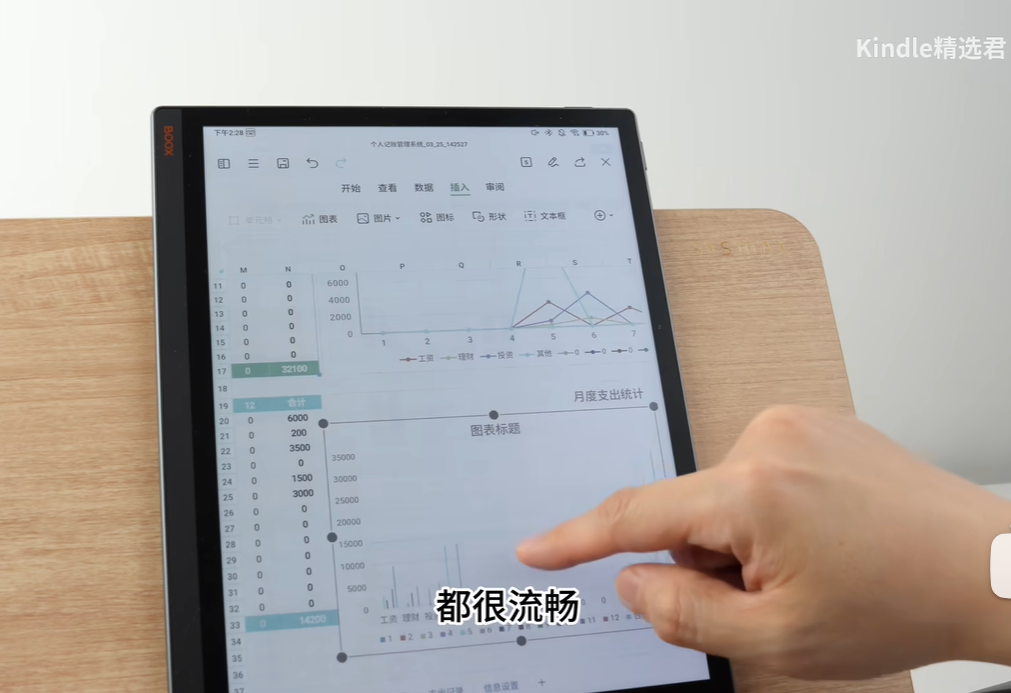
它的分屏功能也非常对打工人的胃口。你可以左边开浏览器查资料,右边开WPS疯狂码字;也可以一边挂着飞书钉钉,一边处理文档。窗口大小可以随意拉拽,鼠标在两边来回窜,复制粘贴一气呵成。

如果说Kindle是让你彻底放松的睡前伴侣,那这台T10C+ 就是随时能帮你清空待办事项的轻办公搭子。
只要你不拿它去修图、剪视频,日常的文档处理它都能轻松拿捏。甚至工作一忙起来,你都会忘了自己在用一块墨水屏。

要说缺点,我觉得主要还是彩屏本身的限制,它仍然采用Kaleido3的技术,只能显示4096种颜色,这限制了它更多的使用场景。

要是你既想用彩屏看图表、刷资讯,又忍不了传统墨水屏的卡顿,那这台兼顾了顺滑与清晰的T10C+,就是你目前最稳妥的选择。你动心了吗?
Hello, everyone. Is the new colored-screen T10C+ from BOOX pure incremental?
Looking at the specs on paper, the CPU, RAM, and storage space haven't changed. You might think, "Wow, they're just changing the name to sell it as a 2026 model?"
The design follows the trend of minor refinements. The number of microphones has increased to 4, and there's an additional AI button on the side. Regarding the screen display, which everyone is most concerned about, you still need to boost the brightness to over 80% to achieve optimal display. Even in a dark room, the picture appears dim. This is because color technology has seen no significant progress over the past year.
With unchanged specs and subtle design modifications, is this machine merely a gimmick? Let's dig deeper and find out.
When discussing color screens, the first question is always about color performance. I directly compared it to the Kindle Scribe Colorsoft. The result might disappoint you: the Kindle is superior in terms of detail.
At maximum brightness, the Kindle is brighter, and while each device has its strengths—such as the BOOX's sharper lines and more saturated colors—the Kindle excels at rendering fine details.
So, if your ultimate goal is a device for reading comics, choose the Kindle. Its color calibration is finer, and its symmetric bezel design is more aesthetically pleasing. However, this quality comes at a hefty price of 5,800 RMB (approximately $800 USD).
In contrast, the T10C+ is significantly cheaper, costing over 2,000 RMB ($280 USD) less. Whether this price difference is worth a slight compromise in color quality is a decision you must make for yourself.
Additionally, the Kindle suffers from a fatal flaw: it is a closed system that does not allow for app installation. If you want a color e-reader not just for comics but also for running apps, browsing the web, or performing work tasks, the open-system T10C+ is the device to consider.
The latest BOOX system introduces "Net Clear" mode, replacing the old high-definition mode. This mode, as the name suggests, aims for clarity. Surprisingly, I found it excellent for browsing the web.
There's no comparison like the old adage suggests. While scrolling the same webpage on the Kindle and the T10C+ reveals the Kindle's sluggish response with a stuttering screen, the T10C+ flows smoothly with minimal lag and ghosting.
Even loading image-heavy apps like Xiaohongshu maintains a high frame rate. However, when you pause to look closely, the screen "shakes" slightly—a characteristic of the screen refreshing to display higher resolution details.
If this "shake" bothers you, you can switch to Fast Mode. While Fast Mode used to be notorious for noise and aliasing, the T10C+ has improved significantly. At a normal reading distance, browsing news feels indistinguishable from HD mode.
The downside is that image quality suffers in fast mode; for example, light-colored buttons may become invisible and require switching back to Net Clear mode.
Beyond software browsing, the device supports bluetooth peripherals, allowing you to set it up as a lightweight workstation. In fast mode, the mouse cursor is highly responsive, almost matching the speed of a standard computer.
Typing on a keyboard is also viable, with a responsive input that, while not lightning fast, keeps up with average typing speeds. The device handles spreadsheets effectively, allowing for data entry, formatting, and chart insertion—ideal for those who need to visually distinguish data via color.
Moreover, the eye strain associated with long work sessions is minimized thanks to the diffuse reflection of the ink screen, which is kinder to the eyes than direct light from LCDs or OLEDs. The device also introduces an "Fast Pro" refresh mode, further improving response times for video playback or casual gaming (though I encountered a bug where videos locked the screen, which has been reported).
The primary limitation remains the technology itself. As a Kaleido3 screen, it is restricted to 4096 colors, which limits its potential for certain applications.
To recap: if you already own the first-generation T10C, there is no need to upgrade. The improvements are evolutionary, not revolutionary, and most software optimizations are likely to be applied via firmware updates. If you demand a device that balances high-color display with fast response times for productivity, the T10C+ is the current market leader.
Are you interested?
Alright, let's sum up. If you already have the previous generation T10C, stick with it — there's no need to upgrade. Advances in color e-paper display technology are slower than a snail's pace, and we'll likely need another 3–5 years to see a qualitative leap forward. Meanwhile, many of the software optimizations on the new model will probably be backported to the old one via firmware updates — Boox is actually stabbing itself in the foot here, but it’s still being generous to old users.
Now, if you want to use a color screen for charts and news while avoiding the sluggishness of traditional e-ink, then this T10C+ — which balances smoothness and clarity — is your safest bet right now. Are you tempted?
原文链接: https://mp.weixin.qq.com/s/BMG3WAnNELL65nwM1NNmfg