

亚马逊退出中国之后,你的 Kindle 在干嘛?泡面盖子?
最近把它翻出来,折腾了一套"信息屏 + 充电底座",直接从吃灰状态变成桌面伴侣。
方案很简单,自建信息屏 + 磁吸充电底座。成本几十块,Kindle 从此不用频繁插拔,摆在桌上当时钟+信息站,比手机屏幕舒服多了。
信息屏:本地 HTML + Kindle 浏览器
核心思路很简单——Kindle 内置的实验性浏览器打开本地 HTML 文件,我们把一个 HTML 页面传到 Kindle 存储目录,用浏览器打开 file:///mnt/us/documents/clock.html,就能显示各种信息。
能显示什么?
微博实时热搜,我自己用的这个 clock 调了微博热搜 API,60 分钟更新一次。
当前天气,接的免费天气 API,温度、天气状况都显示。
大号时钟,E-ink 屏幕,看起来比手机舒服多了,不闪,不伤眼。
看张截图——

页面存在 Kindle 本地,比网络加载速度更快。
如果你只想当时钟,也可以只做纯时钟模式——
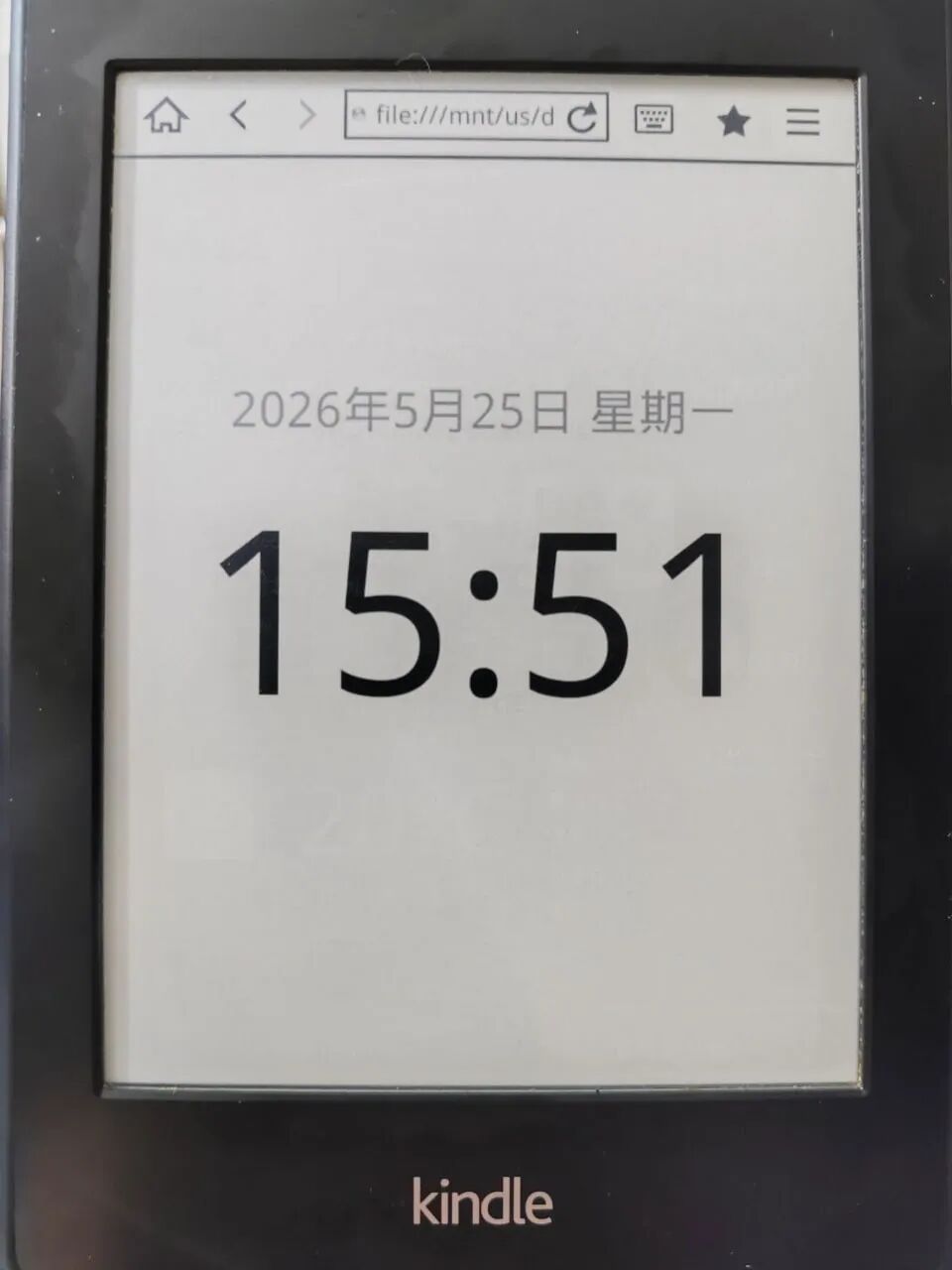
全屏时钟,字体更大。
两种模式
全功能仪表盘模式:微博热搜 + 天气 + 时钟,适合放桌面做信息聚合。
纯时钟模式:字体更大。
充电底座:Energy Fort + 磁吸充电头
这是另一个关键组件,Kindle做信息屏不可能长时间睡眠,必定比看书耗电。
Kindle 那个 Micro-USB 接口很脆弱,频繁插拔很快就松。
Energy Fort 底座 + 磁吸充电头避免频繁频繁插拔,更适合做信息屏使用。

磁吸充电头插进去,往底座上一放,"咔嗒"一声就开始充电。不用找角度,不用怼接口。
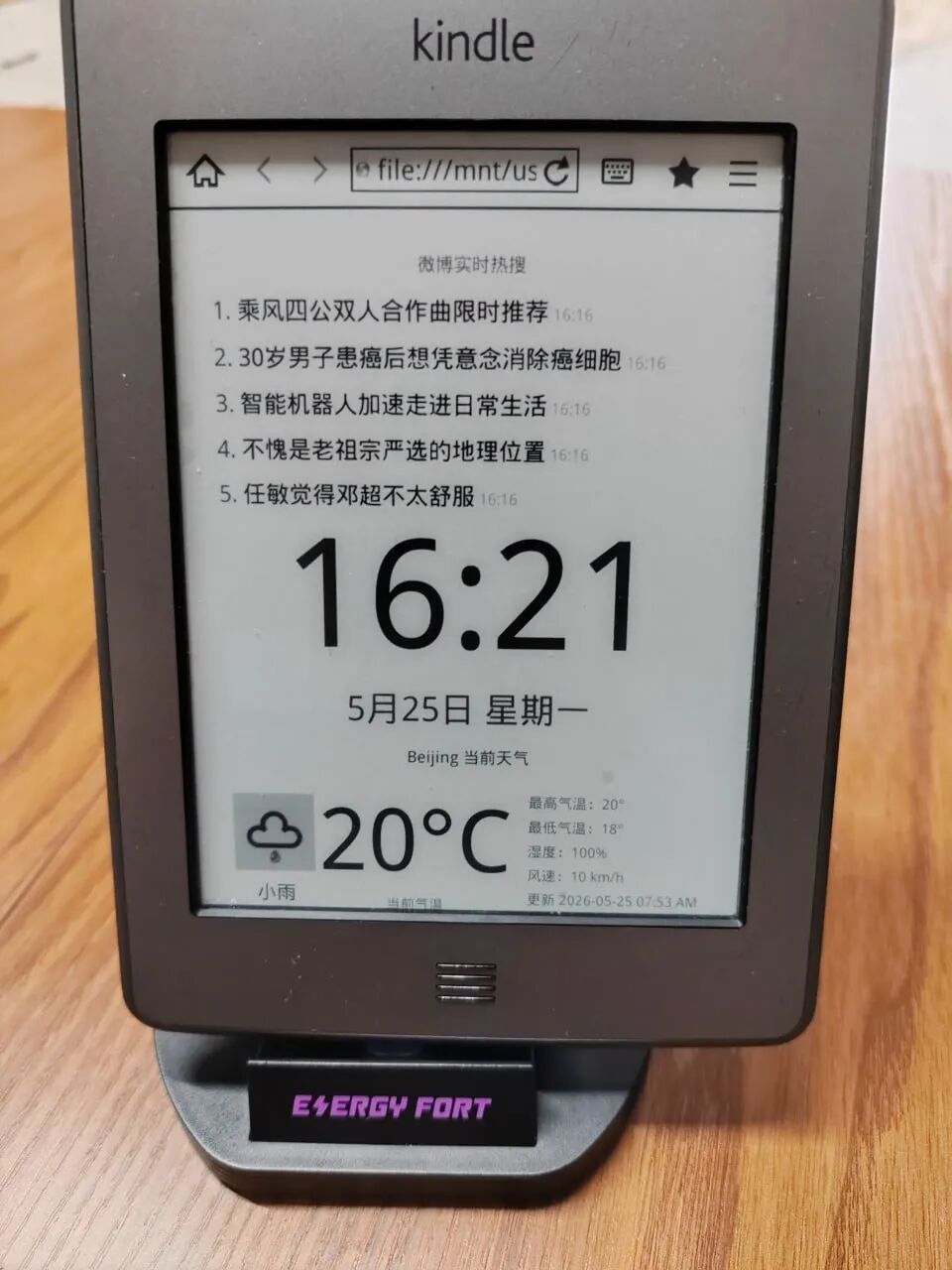
Kindle 往底座上一搭,配合信息屏模式,整台机器变成了一个桌面时钟/信息站。摆在桌面上不占地方,插上电源,不用担心没电。
两种使用方式:本地模式 vs Web Server 模式
本地模式(我用的这种)
HTML 文件存到 Kindle 的 documents 目录,浏览器访问
file:///mnt/us/documents/clock.html
Web Server 模式
如果你有一台常年开着的电脑或者 NAS,可以架一个本地 HTTP 服务器,Kindle 浏览器访问内网地址 http://192.168.x.x/clock.html。
打开一次就缓存到本地,第一次加载较慢,局域网方便更改文件,不用每次传入 Kindle ,更改文件后浏览器刷新一次即可。
Kindle终于活过来了
微博热榜和天气定时刷新(Kindle需处于联网状态),可以保持新鲜感。
Kindle 不用再吃灰,也不用当泡面盖子了。放在桌面上,当一个信息伴侣,还不错。
After Amazon exited China, what are you using your Kindle for? A noodle lid?
I recently dug it out and built a simple "info screen + charging dock" setup, turning it from a dusty paperweight into a desk companion.
The solution is straightforward: a self-built info screen + a magnetic charging dock. Costs just a few tens of dollars, and your Kindle no longer needs frequent plugging and unplugging. Place it on the desk as a clock and info station—much more comfortable than a phone screen.
Info Screen: Local HTML + Kindle Browser
The core idea is simple—the Kindle's built-in experimental browser opens a local HTML file. Transfer an HTML page to the Kindle's storage directory, and open it via the browser at `file:///mnt/us/documents/clock.html` to display various information.
What can it display?
Weibo trending topics in real time—I configured the clock with Weibo's trending API, updating every 60 minutes.
Current weather—connected to a free weather API showing temperature and conditions.
Large clock face—the e-ink screen looks far more comfortable than a phone, no flickering, easy on the eyes.
Here's a screenshot:
The page is stored locally on the Kindle, so it loads faster than pulling from the network.
If you only want a clock, you can use pure clock mode:
Full-screen clock with larger font.
Two modes
Full-featured dashboard mode: Weibo trending + weather + clock, ideal for placing on your desk as an information hub.
Pure clock mode: larger font.
Charging Dock: Energy Fort + Magnetic Charging Head
This is another key component. Running the Kindle as an info screen means it can't sleep for long, so it consumes more battery than reading.
The Kindle's Micro-USB port is delicate; frequent plugging and unplugging loosens it quickly.
The Energy Fort dock + magnetic charging head avoids repeated plugging, making it much better suited for info-screen use.
Snap the magnetic charging head onto the Kindle, place it on the dock—"click," and it starts charging. No need to fumble for angles or force the connector.
Rest the Kindle on the dock, combine it with the info screen mode, and the whole device becomes a desk clock/info station. It doesn't take up much space, stays plugged in, and you never have to worry about the battery dying.
Two Usage Modes: Local vs. Web Server
Local Mode (what I'm using)
Store the HTML file in the Kindle's `documents` directory and access it via the browser.
`file:///mnt/us/documents/clock.html`
Web Server Mode
If you have a PC or NAS running 24/7, you can host a local HTTP server, and the Kindle browser accesses the intranet address like `http://192.168.x.x/clock.html`.
It caches locally after the first open. The first load is slower, but you can edit files on your LAN without transferring them to the Kindle each time—just refresh the browser after making changes.
The Kindle is alive again
Weibo trending and weather refresh automatically (as long as the Kindle is connected to the internet), keeping content fresh.
No more collecting dust, no more noodle lids. Placed on the desk as an information companion—it's pretty nice.
Original link: https://mp.weixin.qq.com/s/8nnkWGEY-iKJJkMfYyOhhw